
2026 Offseason Campaigns
Each fall, United Way partners with hundreds of companies to run workplace giving campaigns that empower donors to invest in significant and measurable solutions that foster wellness and opportunity for the whole community. Employees can log in to a secure website to make their annual contributions and participate in the campaign during our fundraising season.
New in 2026 – Offseason Giving!
Beginning in 2026, United Way is able to keep these sites open all year. We will still run our community campaign each fall, but donors in the United Way of Greater Milwaukee & Waukesha County's footprint can now make a gift outside of our traditional campaign timeline and see their cumulative impact in one centralized location.
Invest in one of United Way's Key Initiatives, support the Backpack Coalition, or help us keep our Diaper Bank stocked-- all in one place, all year round!
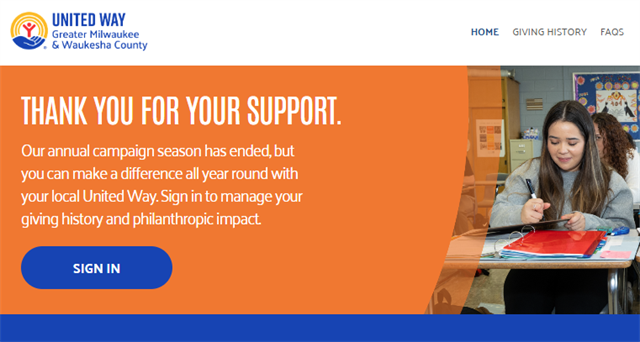
Same link, same username, same password. Returning donors can log in using the credentials established during campaign season, and new gifts will appear in the giving history section of the Donor Hub.
Some organizations' campaign giving sites offer self-registration, and if that is enabled, new users can register at any time of the year and donate. If your organization's campaign site does not have self-registration and you need to register, please contact our Donor Help Desk.
United Way utilizes StratusLIVE's Give at Work and Ignite platforms for workplace giving and fundraising.
What's different
- What Payment Methods are available?
Offseason Giving sites are able to process gifts made by credit card. During the campaign season, Give at Work sites can also accommodate payroll deduction, direct bill, stock, donor advised funds, and more, at the direction of the partner organization.
- Can I designate to another nonprofit organization in Offseason Giving?
No, the site functionality is only able to accommodate investments in United Way of Greater Milwaukee & Waukesha County's Key Initiatives and select sponsorship fundraising at this time. Give at Work sites can accommodate designations to any nonprofit organization during our campaign season.
- Can employees outside of the United Way of Greater Milwaukee & Waukesha County's footprint participate?
The opportunity to donate in the Offseason Giving site is limited to people whose workplaces are in United Way of Greater Milwaukee & Waukesha County's area; however, all employees can log in to their organization's Give at Work sites year-round to manage their philanthropic impact.
Tips & Tricks
- Trouble viewing the site in your browser? StratusLIVE's Give at Work and Ignite modules are optimized for Google Chrome and Firefox web browsers. Some organizations have security and firewall settings that may prohibit access to processing websites, and often in these cases, donors have been able to complete their pledges via personal networks or mobile devices.
- Disable Autofill to avoid errors in your forms. Browsers may use tools like Autofill to make filling out forms easier, but this can cause frustrations while making your pledge if incorrect information gets submitted. You can disable Autofill in the Security or Payment settings of your browser, which is recommended if donors are sharing devices to make their pledges.
Donor Help Desk
Donors can direct questions to the Donor Help Desk, which works in a combination of in-office and remote environments to provide fast and efficient customer service during normal business hours of 8:00 a.m. - 5:00 p.m. CST Monday through Friday. You can reach the Donor Help Desk at donor@unitedwaygmwc.org. A representative will be in touch within three business days during the campaign season.
Should you prefer to communicate by phone, please email us your name, company name, phone number, and a brief description of the issue and someone will call you directly.
Give to United Way
Log in and scroll down on the Home page. Select Give Now on the Give to United Way campaign to invest in United Way of Greater Milwaukee & Waukesha County or one of our Key Initiatives.
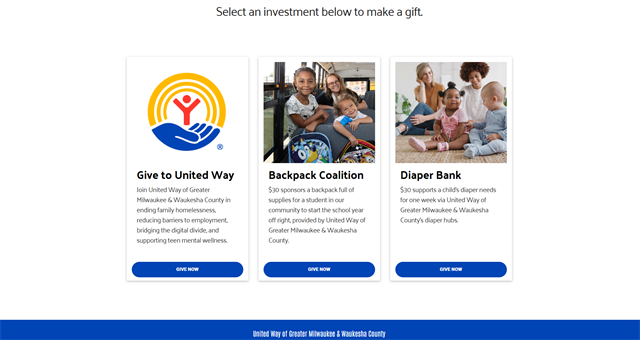
Select Credit Card as your Payment Method. Enter the amount of your gift and your payment details, and click Continue.
Distribute the value of your gift. Details will display in the Preview panel on the right side of the screen.
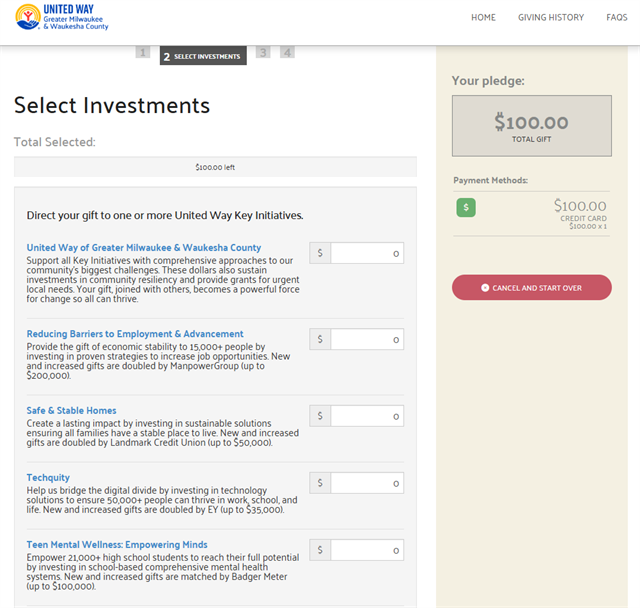
Enter or update your personal profile details on the next page, and Review & Complete your gift.
Shortly after completing your transaction, you will receive an email confirmation with details.
Give to Backpack Coalition or Diaper Bank
Log in and scroll down on the Home page. Select Give Now on the Backpack Coalition or Diaper Bank campaign.
Click Add Gift and select Credit as your Payment Method. Enter the amount of your gift and your payment details, and click Continue.
The value of your gift will be directed to the campaign you've chosen, as seen in the Preview panel on the right side of the screen.
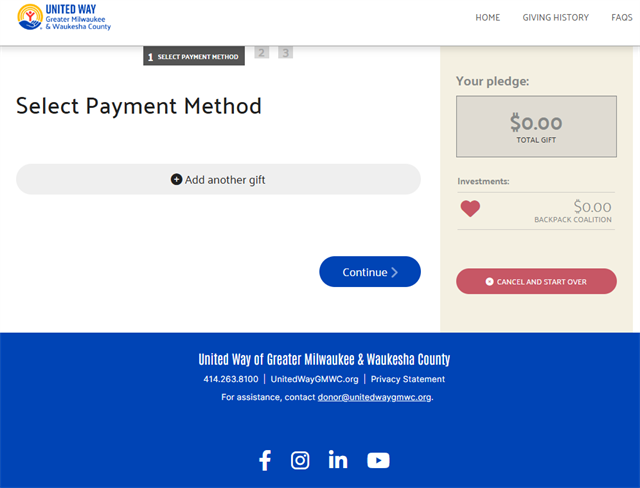
Enter or update your personal profile details on the next page, and Review & Complete your gift.
Shortly after completing your transaction, you will receive an email confirmation with details.